EoSim — Virtual Platform Simulator
150 Platforms · GPIO Visualizer · HIL Bridge · GDB Support
A full-system virtual platform simulator for EoS firmware. Run unmodified EoS binaries on 150 simulated platforms — with a graphical GPIO pin visualizer, UART terminal, hardware-in-the-loop (HIL) bridge, and GDB debugging support.
How It Works
Step-by-step flow — from initialization to output.
List Available Platforms
EoSim ships with 150 pre-configured virtual platforms covering all major EoS reference boards. Use eosim list to browse them by architecture, MCU family, or peripheral set.
# List all platforms
eosim list

# Filter by architecture
eosim list --filter cortex-m4

# Search by board name
eosim search stm32f4
Run Your Firmware
Point EoSim at your compiled .elf or .eos binary. It loads the firmware, maps peripherals to the simulated board, and starts executing — no hardware required.
# Run firmware on STM32F4 Discovery
eosim run build/firmware.elf --platform stm32f4-discovery

# Run with graphical GPIO visualizer
eosim run build/firmware.elf --platform stm32f4-discovery --gui

# Run with UART output to terminal
eosim run build/firmware.elf --platform stm32f4-discovery --uart0
Debug with GDB
EoSim exposes a GDB stub on port 3333. Connect any GDB client to set breakpoints, inspect registers, and step through your firmware — exactly as you would on real hardware.
# Start EoSim with GDB server
eosim run firmware.elf --platform stm32f4 --gdb
# GDB server listening on :3333

# In another terminal:
arm-none-eabi-gdb firmware.elf
(gdb) target remote :3333
(gdb) break sensor_task
(gdb) continue
(gdb) print temp_reading
Use the GPIO Visualizer
The --gui flag opens a graphical pin state visualizer showing all GPIO pins, their current state (high/low/PWM), and a logic analyzer trace. Perfect for debugging SPI, I²C, and UART protocols.
# Open GUI with logic analyzer
eosim run firmware.elf --platform stm32f4 --gui --trace spi1,uart2

# Export trace to VCD for GTKWave
eosim run firmware.elf --platform stm32f4 --trace-out trace.vcd
Hardware-in-the-Loop (HIL) Bridge
The HIL bridge connects EoSim's virtual peripherals to real hardware. Simulate the firmware logic while driving real sensors, actuators, or communication buses — the best of both worlds.
# HIL bridge: virtual firmware + real I2C sensor
eosim run firmware.elf --platform stm32f4 \
    --hil i2c1:/dev/i2c-1 \
    --hil uart2:/dev/ttyUSB0
Usage Examples
Real-world scenarios showing EoSim in action.
A CI pipeline runs 500 firmware test cases in EoSim in under 2 minutes — no hardware needed.
# Run all tests in EoSim (headless)
eosim test tests/ --platform stm32f4-discovery --timeout 120

# Output:
# Running 500 test cases on stm32f4-discovery...
# [PASS] test_uart_loopback          (12 ms)
# [PASS] test_spi_sensor_read        (8 ms)
# [PASS] test_eai_kws_inference      (45 ms)
# [PASS] test_edb_insert_query       (23 ms)
# ...
# 500/500 passed in 98 s
Features
The shape of EoSim at a glance.
150 Virtual Platforms
Pre-configured simulations of STM32, NXP i.MX, Raspberry Pi, ESP32, RISC-V SiFive, NVIDIA Jetson, and more.
Binary Compatible
Run unmodified .elf or .eos binaries — no recompilation or simulation-specific code.
GPIO Visualizer
Graphical pin state display with logic analyzer trace for SPI, I²C, UART, and PWM.
GDB Stub
Built-in GDB server on port 3333. Set breakpoints, inspect memory, and step through code.
HIL Bridge
Connect virtual peripherals to real hardware via /dev/i2c-*, /dev/ttyUSB*, etc.
Headless Mode
Run without GUI for CI pipelines. JSON test result output for automation.
Multi-Board Simulation
Simulate multiple boards communicating via virtual UART, SPI, or TCP/EIPC.
Trace Export
Export GPIO traces to VCD format for GTKWave analysis.
Role in the EoS Ecosystem
Why EoSim matters — and what breaks without it.
EoSim dramatically accelerates EoS development by eliminating the hardware dependency during the development and testing cycle. Developers can write, test, and debug firmware on their laptop before a single physical board is available. CI pipelines can run hundreds of firmware test cases in minutes. The HIL bridge means that when real hardware is needed, EoSim can still handle the firmware logic while real sensors and actuators are connected. EoSim is what makes EoS development scalable — a team of 10 developers doesn't need 10 physical boards of every type.
Depends On
Enables / Powers
Open source on GitHub
MIT licensed and developed in the open. Issues, discussions, and pull requests welcome.
In the EoS stack
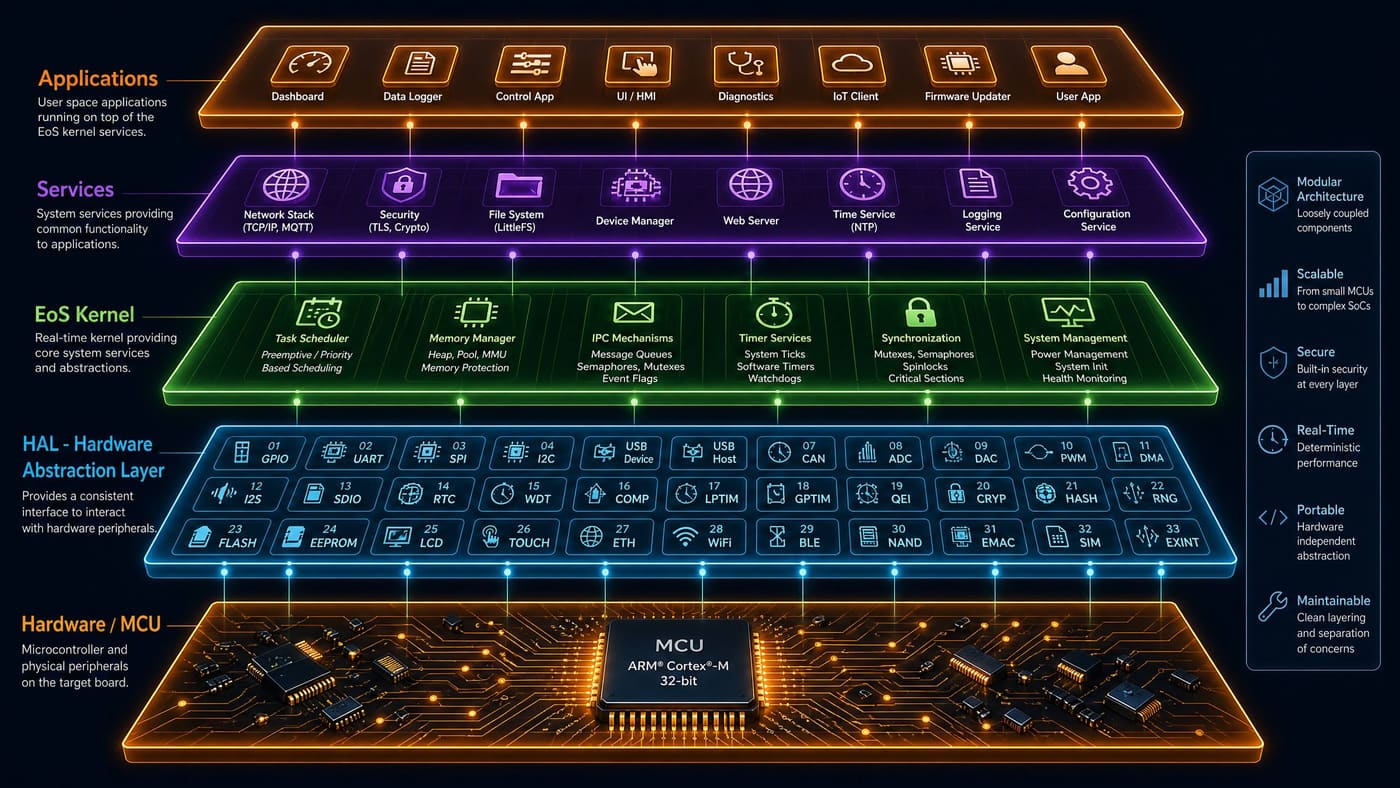
EoSim is highlighted in the layer below.
Pairs well with
Sibling components that EoSim commonly works alongside.
Technical Specifications
| Simulated Platforms | 150 (STM32, NXP i.MX, Raspberry Pi, ESP32, RISC-V, NVIDIA Jetson, …) |
| Simulation Engine | QEMU-based with EoS-specific peripheral models |
| GDB Protocol | GDB Remote Serial Protocol on configurable port (default: 3333) |
| Trace Format | VCD (Value Change Dump) for GTKWave; JSON for automation |
| HIL Transports | I²C (/dev/i2c-*), UART (/dev/ttyUSB*), SPI (/dev/spidev*) |
| Boot-to-Prompt | < 5 ms for Cortex-M targets |
| License | MIT |