
Open hardware you can verify
We catalogue development-board design files board by board, decide every claim from the bytes we retrieved, keep a credited copy of every file whose licence allows it, and validate our own designs by simulation. Everything on this page is rendered from those files.
A 69-second walkthrough, without sound, captioned. Every picture in it is a real file, tool output or simulation result.
- board records
- 336
- board records
- ecosystems from issue #28
- 29 of 31
- ecosystems from issue #28
- openly licensed CAD files mirrored
- 4,022
- openly licensed CAD files mirrored
- boards with their CAD files mirrored
- 254
- boards with their CAD files mirrored
Figures as of 18 October 2026, counted on eCAD-Hardware-Products master 0e543f0.
How a file gets into the mirror
The database records where each board's files live and the commit of the manufacturer's repository they come from. The mirror keeps each board's whole design, 4,022 CAD files and 4.36 GB from 254 boards, and copies a file only when all three of these hold.
The licence allows it
Only boards whose record sets redistribution_allowed to true are copied. Unknown is not permission: the other 80 boards keep their official link and digest, and nothing else.
The bytes are the manufacturer's bytes
Each board's whole design is copied: every CAD file at the commit of the manufacturer's repository its record pins. Each file must match the git blob ID at that commit, or the SHA-256 the database recorded, so the mirror holds the manufacturer's file exactly.
The bytes are CAD
Each file is identified from its content: Eagle, KiCad, Altium, OrCAD, Allegro and PADS sources, Gerber and drill files, STEP, STL and other 3D models. Archives are unpacked to their CAD files. PDFs, BOMs, readmes and anything else are left out.

How to use the files
Six steps from a board record to a board you can build, each shown with a real file and its real output. The commands need Git, Python 3 and, for the last two, Node.js.
A 45-second how-to, without sound, captioned.
- Step 1
Find a board
Every board has one record: the exact board, revision and MCU, each format marked true, false or unknown, and the licence. Ask the database by format, licence or vendor.
python3 tools/devboard_cad/query.py with-formats step
python3 tools/devboard_cad/query.py commercial-reuse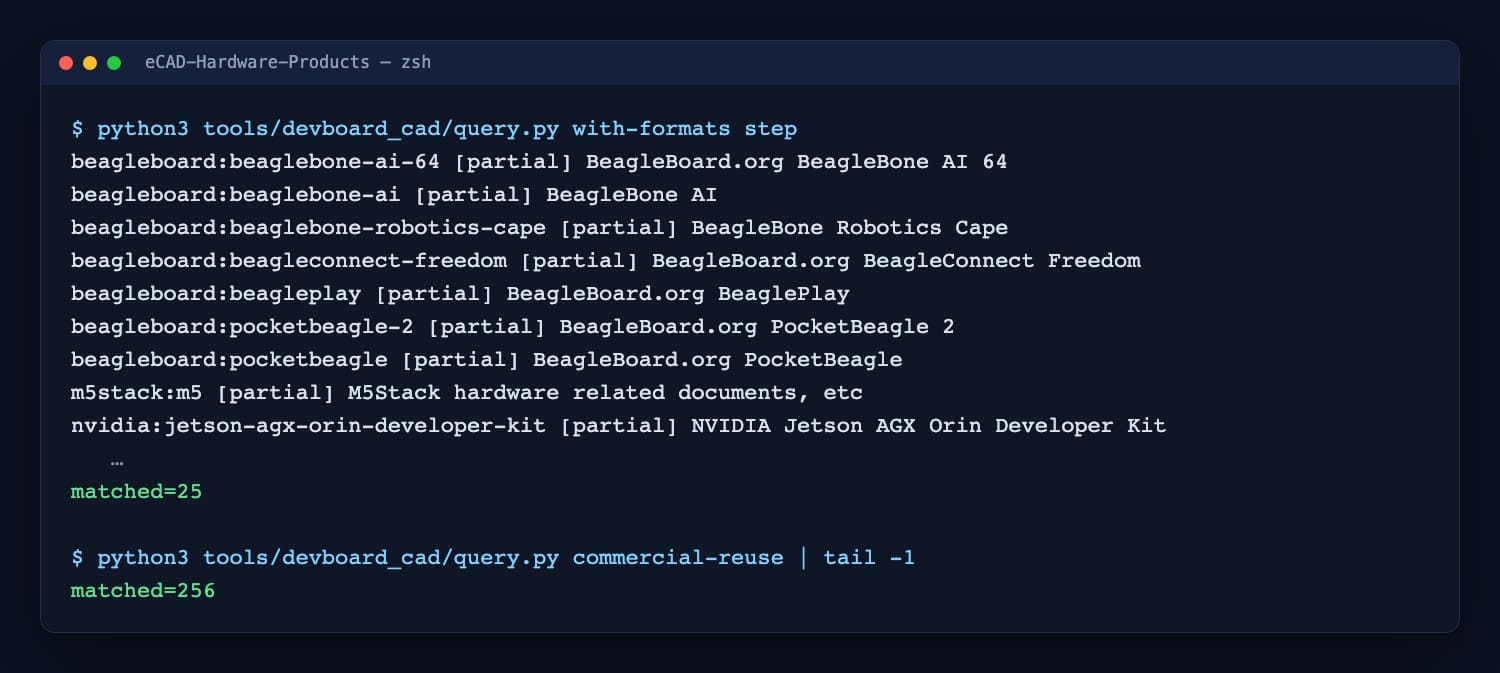
25 boards have a verified STEP model, and 256 records allow commercial reuse. - Step 2
Fetch one board, not the whole mirror
A partial clone downloads only the folder you name. The SparkFun IoT RedBoard RP2350, its whole KiCad project and Gerbers in 33 files, took 9 seconds and 101 MB, against 4.36 GB for every board, and shasum gives the same SHA-256 as its ATTRIBUTION.md.
git clone --filter=blob:none --sparse --depth 1 https://github.com/embeddedos-org/eCAD-Hardware-Products.git
cd eCAD-Hardware-Products
git sparse-checkout set --no-cone /boards/cad/sparkfun/iot-redboard-rp2350/
shasum -a 256 boards/cad/sparkfun/iot-redboard-rp2350/cad/Hardware/*.kicad_sch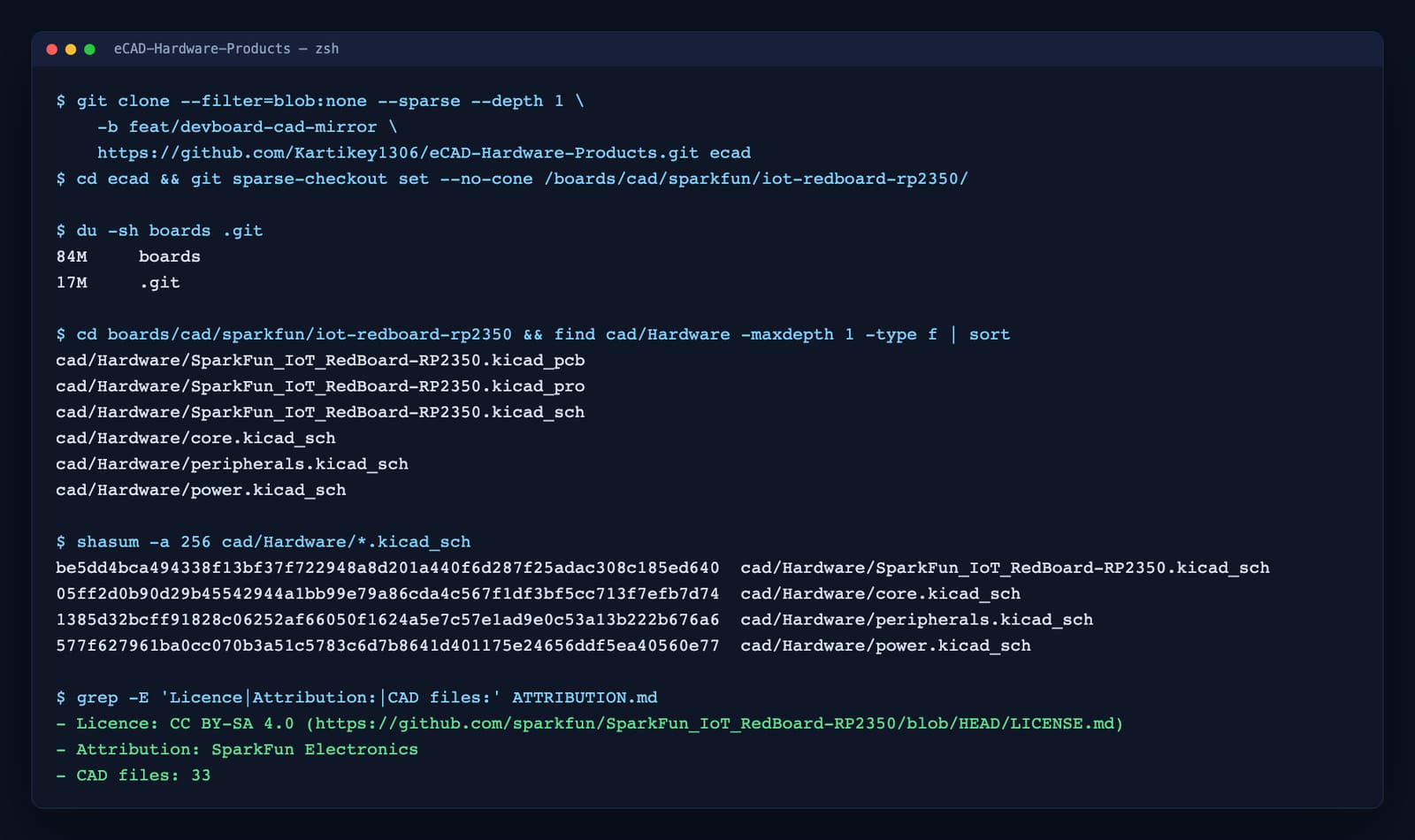
Recorded on the pull request branch before the mirror reached master, which is why it names a branch and a fork. - Step 3
Open the design in KiCad
The RedBoard's .kicad_pcb and .kicad_sch were saved by KiCad 8, so KiCad 8 or later opens them as they are. Its folder holds the whole project: the project file, the PCB, the root sheet and its three sub-sheets. The Eagle .brd and .sch files, 748 of the 4,022, go through KiCad's EAGLE importer.
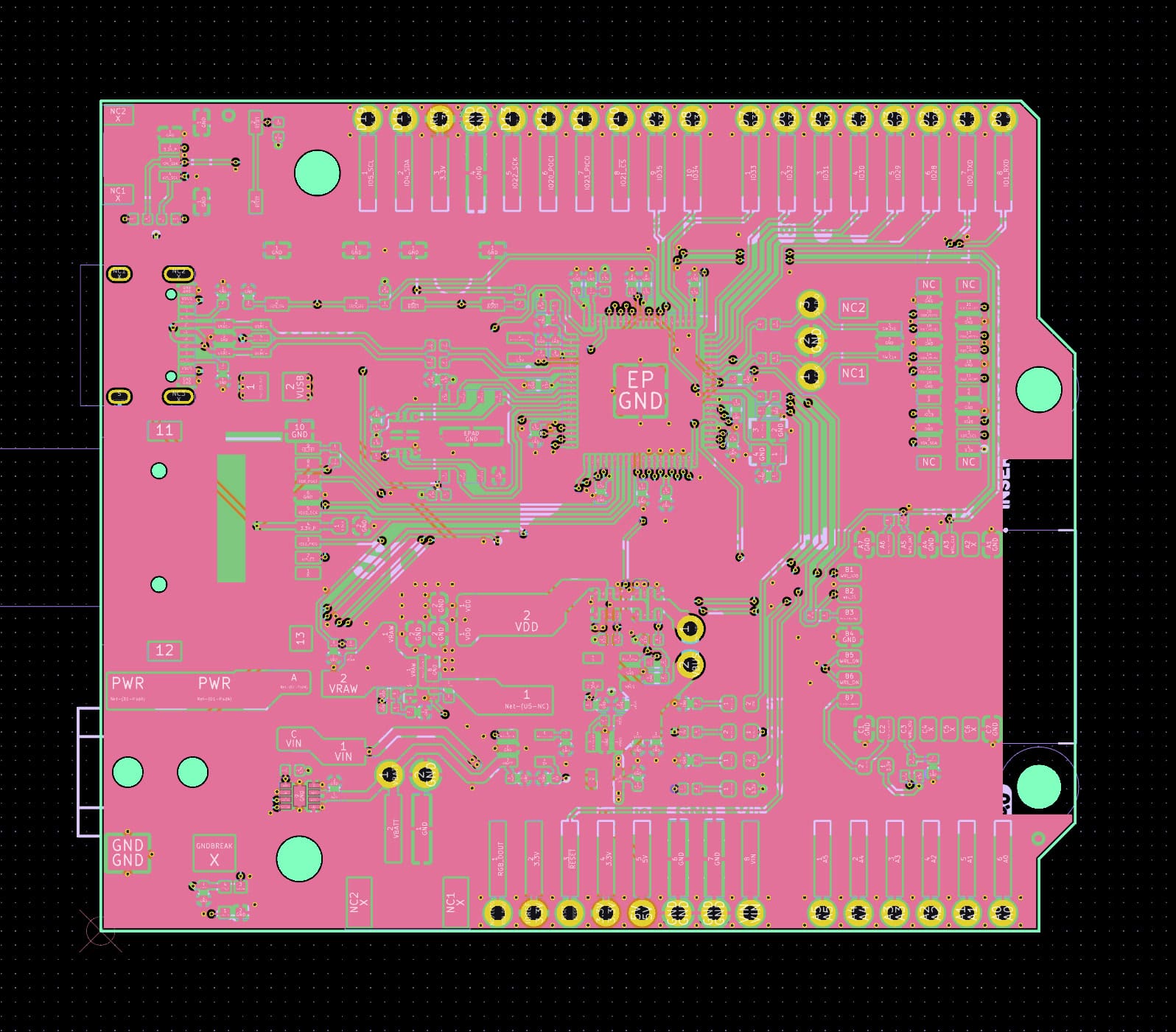
SparkFun_IoT_RedBoard-RP2350.kicad_pcb, rendered from the mirrored file. - Step 4
Send the Gerbers to a board house
A Gerber set is what a fab asks for: copper, solder mask, silkscreen and paste for each side, the board outline and the Excellon drill file. Zip the folder and upload it. Here the open-source whats-that-gerber library names each layer of the SparkFun Edge set.
cd boards/cad/sparkfun/edge/cad/Hardware/SparkFun_TensorFlow_Ambiq_Apollo3-Gerbers
ls | xargs node gerber-layers.mjs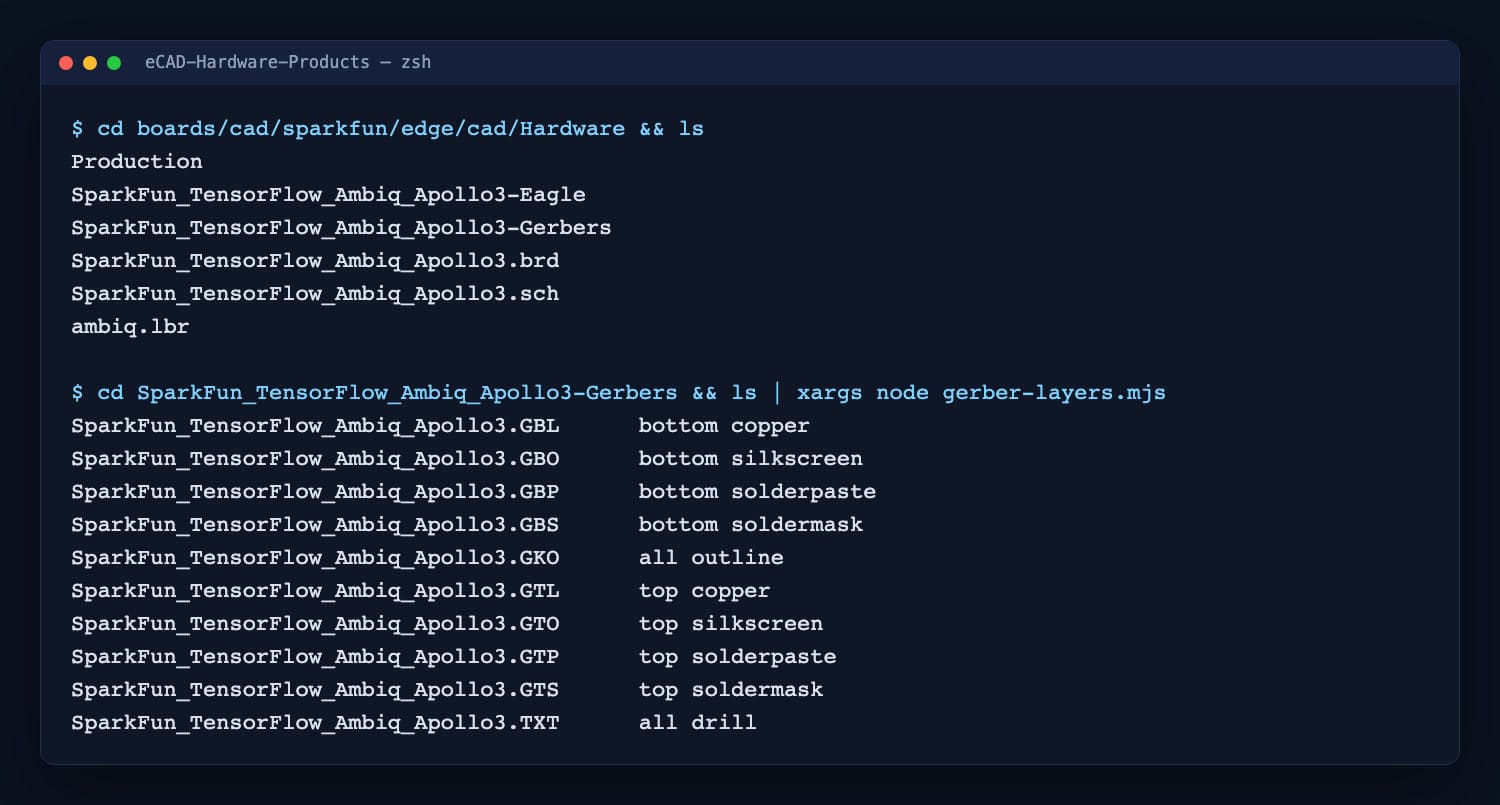
Ten files, ten layers. The rendered board is in the Gerber section below. - Step 5
Design the enclosure around the STEP model
Import the STEP into FreeCAD, Fusion or SolidWorks and model the case around it. Measured from the geometry with OpenCASCADE, the BeagleBone AI-64 is 102.5 × 82.6 × 36.6 mm with its heatsink and connectors, and the PocketBeagle is 56.4 × 35.0 mm.
cd boards/cad
for f in beagleboard/beaglebone-ai-64/cad/hw/*.stp beagleboard/pocketbeagle/cad/models/*.step; do node measure-step.mjs "$f"; done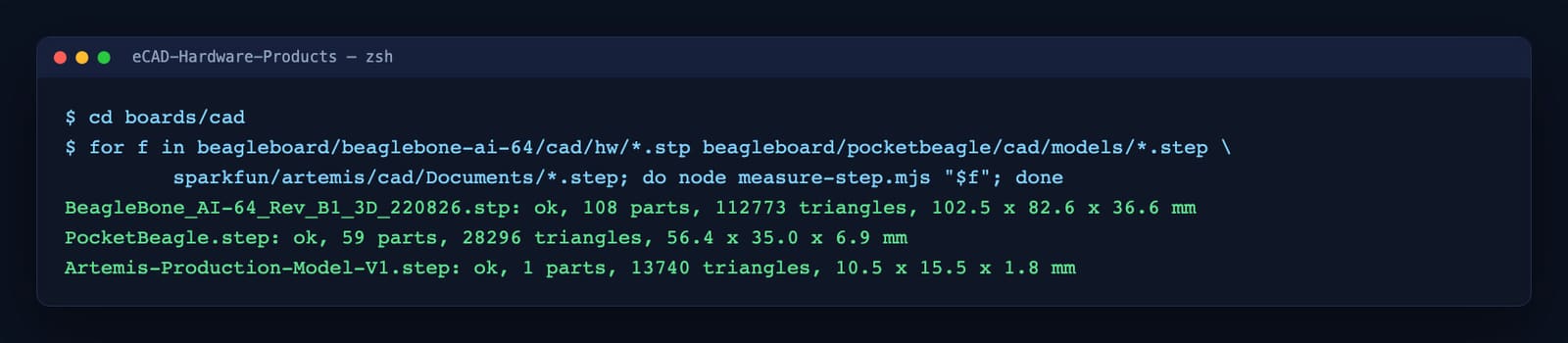
Overall size in millimetres, from each manufacturer's own STEP file. - Step 6
Keep the credit and the licence
These are the manufacturers' designs, copied unmodified so they can be checked against the originals. Each board folder carries an ATTRIBUTION.md naming the maker, the licence, every file's official source and SHA-256, and what was left out. The 80 boards without a confirmed redistribution licence are linked, never copied.
- CC BY-SA · 225 boards
- Credit the maker, and share your changed design under the same licence.
- CC BY 4.0 · 21 boards
- Credit the maker.
- MIT, BSD or Apache-2.0 · 7 boards
- Keep the licence text with every copy. Each of these boards' ATTRIBUTION.md carries it, verbatim.
- Raspberry Pi's grant in 0BSD wording · 1 board
- Nothing: use, copy, modify and distribute the Pico designs for any purpose.
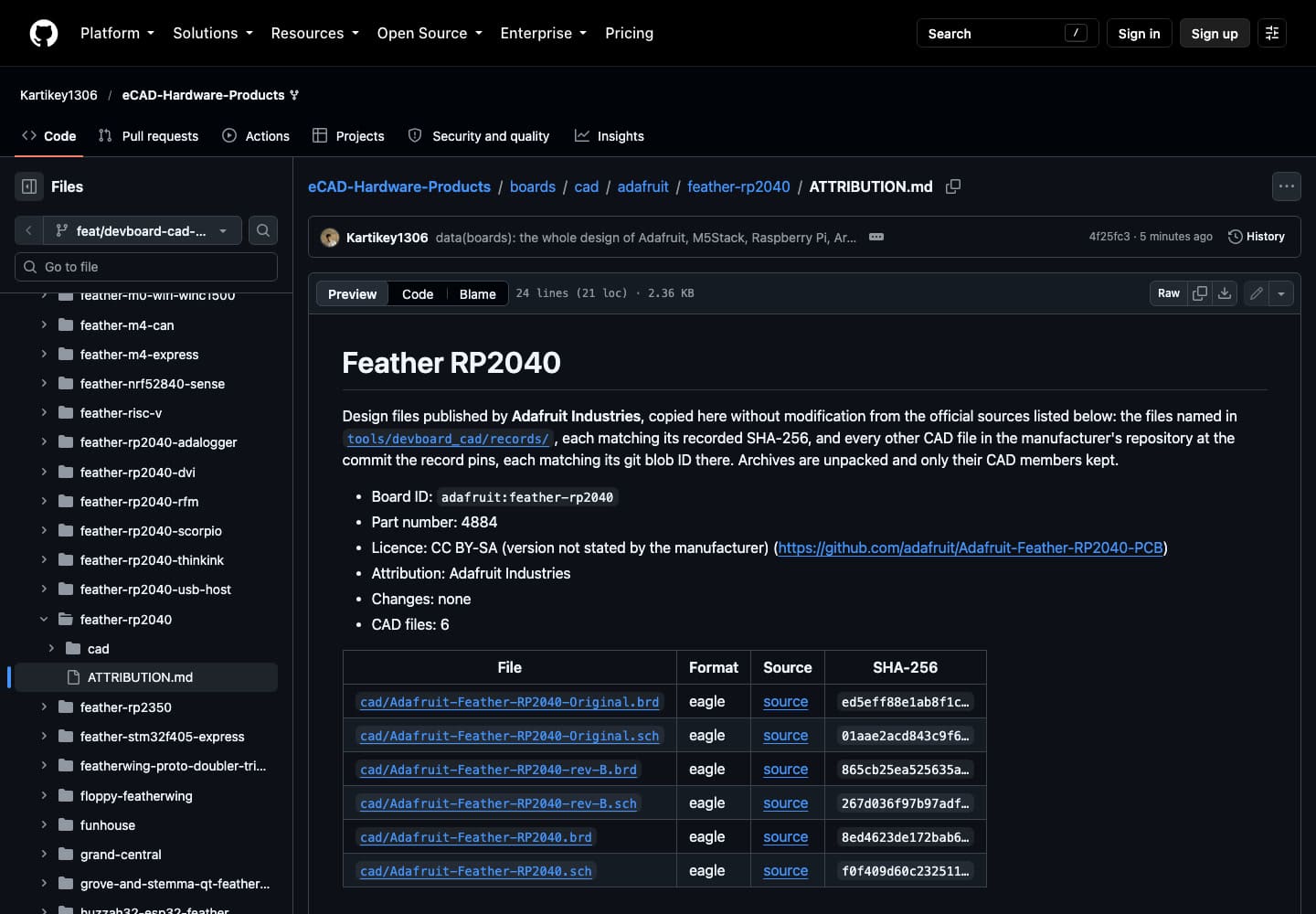
boards/cad/adafruit/feather-rp2040/ATTRIBUTION.md


The two helper scripts used in steps 4 and 5
Both run on Node.js after npm install whats-that-gerber occt-import-js. Neither changes a file.
import { createRequire } from "node:module";
const require = createRequire(import.meta.url);
const whatsThatGerber = require("whats-that-gerber");
const names = process.argv.slice(2);
const types = whatsThatGerber(names);
for (const n of names) {
  const t = types[n];
  console.log(`${n.padEnd(42)} ${t.side ?? "-"} ${t.type ?? "unknown"}`);
}import { createRequire } from "node:module";
import { readFileSync } from "node:fs";
const require = createRequire(import.meta.url);
const occt = await require("occt-import-js")();
for (const path of process.argv.slice(2)) {
const r = occt.ReadStepFile(new Uint8Array(readFileSync(path)), null);
const lo = [Infinity, Infinity, Infinity], hi = [-Infinity, -Infinity, -Infinity];
let tris = 0;
for (const m of r.meshes) {
const p = m.attributes.position.array;
for (let i = 0; i < p.length; i += 3) for (let k = 0; k < 3; k++) { lo[k] = Math.min(lo[k], p[i + k]); hi[k] = Math.max(hi[k], p[i + k]); }
tris += m.index.array.length / 3;
}
const d = hi.map((h, k) => (h - lo[k]).toFixed(1));
console.log(`${path.split("/").pop()}: ${r.success ? "ok" : "failed"}, ${r.meshes.length} parts, ${tris} triangles, ${d.join(" x ")} mm`);
}KiCad boards and schematics
Rendered with KiCanvas straight from the manufacturers' .kicad_pcb and .kicad_sch files: copper on four layers, pads, vias, silkscreen and the full schematic sheet.


Eagle boards
748 of the mirrored files are Eagle sources. These were drawn from the board XML itself: top copper in red, bottom copper in blue, pads, vias, silkscreen and the board outline.


Gerber fabrication files
What a board house receives: ten Gerber and drill layers from the SparkFun Edge archive, stacked into the top and bottom of the finished board.


3D models
25 boards have a verified STEP model. Each of these was tessellated with OpenCASCADE and lit in three.js. The shapes and positions are the manufacturer's model; the shading colours are the renderer's and can differ from the colours in the file.


Our own designs, checked by simulation
Three dataset items in the eCAD repository run end to end through the V0 to V4 validation pipeline, one per engineering domain, with the industry tools named below. The plots are from those runs.

Volumes and inertia extracted from the STEP model, then statics, rated moves, free swing and clearance simulated against the joint's requirements.

48 V servo-drive input: 4.72 A inrush peak, bus at 90% in 10.9 ms, 47.9 V steady, then a 4.17 A drive load and an injected short-circuit fault.

UART 8N1 loopback at 115,207 baud measured: 434 clock cycles per bit, both bytes received, 0 bit errors and 0 framing errors.
Work with us on open hardware
Universities
- Course labs on real board files: open a KiCad or Eagle design, read its Gerbers, measure its STEP model.
- Research and student projects on the validation pipeline, with mechanical, electrical and digital domains to extend.
- Validating our board ports on real hardware: most boards are described today, not yet tested on silicon.
Companies
- Reference designs your engineers can open in their own tools, with the licence attached to every file.
- Board bring-up and dev-kit validation for EmbeddedOS on your silicon.
- Joint grant proposals and letters of collaboration for open-source hardware work.