
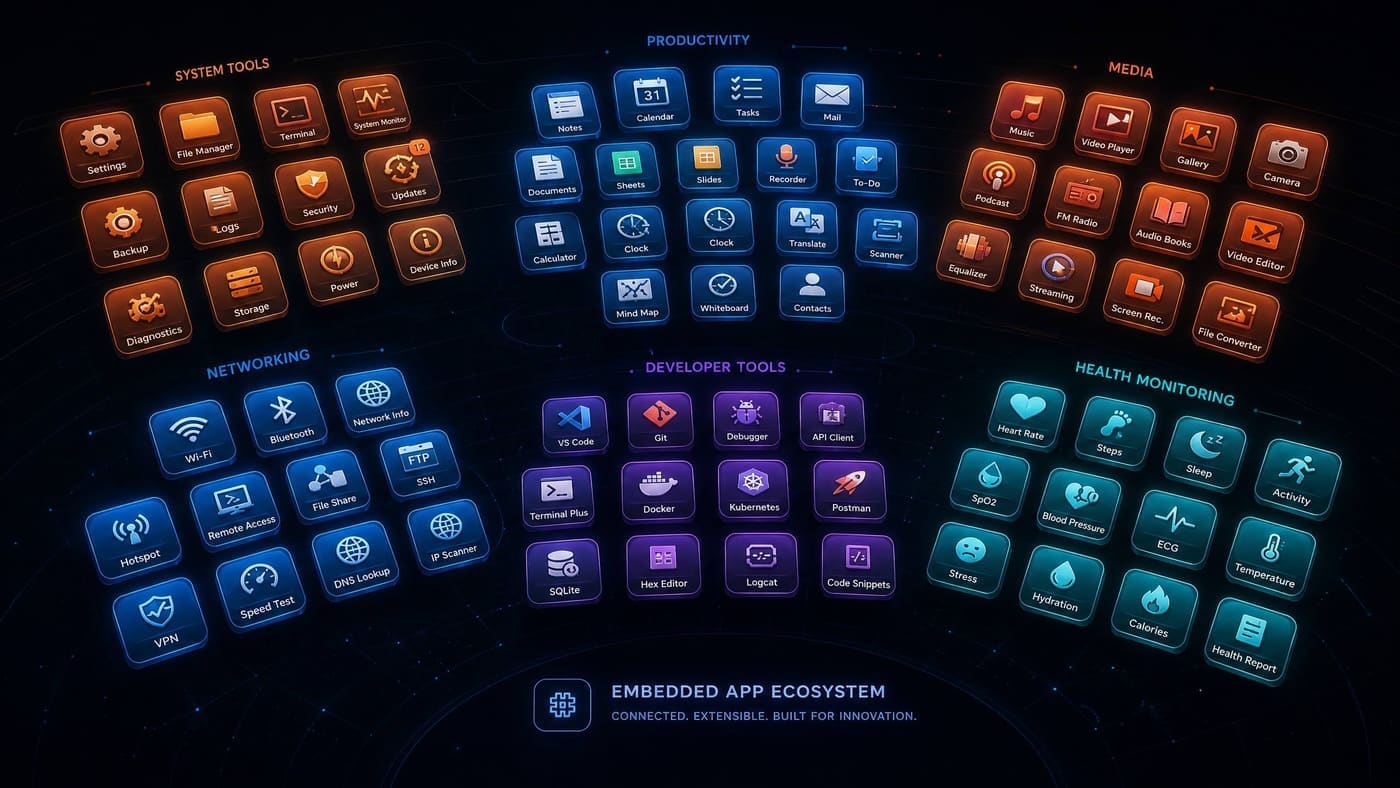
App Ecosystem
eApps — Embedded Application Ecosystem
60+ First-Party Apps · Package Manager · App Store
The EoS first-party application ecosystem. 60+ apps spanning productivity, developer tools, system utilities, health, and entertainment — all built for embedded hardware, distributed via the eApps package manager, and installable on any EoS device.
For a shorter introduction to eApps, see the eApps overview. This page is the engineering detail.
- Mixed
- MIT licensed
- Important — Extended Stack
- 60+First-Party Apps
- eAppsPackage Manager
- MITAll Apps Open Source
- < 1 MBTypical App Size
How It Works
- 1
Browse and Install Apps
Use the eApps CLI or the EoStudio App Browser to search, install, and update apps. All apps are signed with Ed25519 and verified by eBoot before installation.
# Search for apps
eapps search weather

# Install an app
eapps install eweather

# List installed apps
eapps list

# Update all apps
eapps update --all
- 2
Launch Apps via EIPC
Apps are launched by sending EIPC messages to the EoS platform launcher. This enables one app to open another — for example, eMail opening an attachment in eWrite.
// Launch eWeather from your app eipc_msg_t msg = { .service = "eos.launcher", .action = "launch", .payload = {"app": "eweather", "args": {"city": "San Francisco"}} }; eipc_send(launcher_port, &msg, sizeof(msg)); - 3
Publish Your Own App
Build your app with eBuild, sign it, and submit it to the eApps registry. The registry runs automated security scanning and compatibility testing before publishing.
# Build and package your app
ebuild build --target eapp

# Sign the package
ebuild sign --key my_app_key.pem build/myapp.eapp

# Submit to eApps registry
eapps publish build/myapp.eapp --registry apps.embeddedos.org
Usage Examples
// Smart home hub app bundle
// manifest.yml
packages:
  - eweather: 1.2.0    // Weather display
  - ehome: 2.0.0       // Smart home control
  - eenergy: 1.0.0     // Energy monitoring
  - eoffice-suite: 1.0.0  // Productivity

// eHome controls lights via EIPC → eIPC → Zigbee bridge
eipc_msg_t cmd = {
    .service = "ehome.lights",
    .action  = "set",
    .payload = {"room": "living_room", "brightness": 80}
};
eipc_send(ehome_port, &cmd, sizeof(cmd));
Features
60+ First-Party Apps
Productivity, developer tools, system utilities, health, entertainment, and IoT apps.
Package Manager
CLI and GUI package manager with dependency resolution, version pinning, and rollback.
Signed Packages
All packages are Ed25519 signed. eBoot verifies signatures before installation.
App Store
Web-based app store at apps.embeddedos.org with search, ratings, and reviews.
EIPC Integration
Apps communicate via EIPC — launch, share data, and integrate with system services.
< 1 MB Typical Size
Apps are optimized for embedded storage — most apps fit in under 1 MB.
Auto-Update
Background app updates with A/B slot mechanism — no downtime.
Sandboxing
Each app runs in an EoS process with capability-limited access to system resources.
Role in the EoS Ecosystem
eApps is the application ecosystem that makes EoS a complete platform rather than just a kernel. The 60+ first-party apps demonstrate what EoS can do in practice — from weather displays to smart home control to developer tools. The package manager and app store infrastructure make it easy for third-party developers to build and distribute EoS apps, growing the ecosystem beyond what the EmbeddedOS Foundation can build alone. eApps is what turns an EoS device from a development board into a product.
Depends On
- EoS Kernel — all apps run as EoS processes
- eBoot — app packages are signed and verified before installation
- EIPC — inter-app communication and platform service access
- eDB — app data storage
- eOffice Suite — many apps integrate with eOffice
Enables / Powers
- End users — the primary way users extend their EoS devices
- Third-party developers — publish apps to the eApps registry
- Smart home, industrial, and consumer EoS devices
Open source on GitHub
MIT licensed and developed in the open. Issues, discussions, and pull requests welcome.
- Mixed
- MIT
Every EmbeddedOS repository, with install commands, is listed on the downloads page.
In the EoS stack
eApps is highlighted in the layer below.
- App layer
- UI / browser layer
- Data layer
- AI runtime
- Neural interface
- IPC fabric
- EoS kernel + HAL
- eos-platform profile
- eBootloader
- Build / IDE / Sim
Pairs well with
Sibling components that eApps commonly works alongside.
Technical Specifications
| First-Party Apps | 60+ across productivity, developer tools, utilities, health, entertainment |
| Package Format | .eapp (signed ZIP with manifest, binary, and assets) |
| Signature Algorithm | Ed25519 |
| Package Manager | eApps CLI + EoStudio App Browser |
| Registry | apps.embeddedos.org (public, open submission) |
| Typical App Size | < 1 MB (binary + assets) |
| License | MIT (all first-party apps) |