
EoStudio — Embedded Development IDE
Board Picker · HAL Configurator · eFlow Editor · AI Assist
The official IDE for EoS development. A Monaco-based code editor with EoS-aware autocomplete for all 197 APIs, a visual board picker, HAL configurator, eFlow block editor, EIPC topology editor, and integrated eBuild + EoSim pipeline.
How It Works
Step-by-step flow — from initialization to output.
Pick Your Board
Open the Board Picker panel and select your target from 41 supported boards. EoStudio automatically configures the BSP profile, linker script, and HAL peripheral set for that board.
// After picking STM32F4 Discovery in Board Picker:
// - BSP profile: stm32f4-discovery
// - Linker script: stm32f4_flash.ld
// - HAL: UART1, SPI1, I2C1, TIM2, ADC1 pre-configured
Configure HAL Peripherals
The HAL Configurator shows a visual pin map of your board. Click a pin to assign it to a peripheral (UART, SPI, I²C, GPIO, PWM). EoStudio generates the eos_hal_init() call automatically.
// Generated by HAL Configurator:
void eos_hal_init(void) {
    eos_hal_uart_init(UART1, 115200, UART_8N1);
    eos_hal_spi_init(SPI1, 8_MHZ, SPI_MODE0);
    eos_hal_i2c_init(I2C1, 400_KHZ);
    eos_hal_gpio_init(PA5, GPIO_OUTPUT);  // LED
    eos_hal_gpio_init(PC13, GPIO_INPUT);  // Button
}Write Code with AI Assist
The Monaco editor provides EoS-aware autocomplete for all 197 kernel and HAL APIs. The AI assist (powered by eAI) suggests code completions, explains APIs on hover, and catches common mistakes.
// Type 'eos_hal_' and get completions for all 33 HAL classes
// Hover over any API to see its documentation inline
// AI Assist: 'This function blocks until data is available.
//             Use eos_hal_uart_read_nb() for non-blocking.'
Build, Simulate, and Flash
One-click Build compiles with eBuild. One-click Simulate launches EoSim with the GPIO visualizer. One-click Flash programs the board. All three are integrated — no terminal required.
// EoStudio toolbar:
// [Build ▶]  → ebuild build
// [Simulate] → ebuild sim --gui
// [Flash ⚡]  → ebuild flash
// [Monitor]  → ebuild monitor
Design EIPC Topology Visually
The EIPC Topology Editor lets you draw services, ports, and capability connections on a canvas. EoStudio generates the eipc_manifest.h and stub code for all services.
// EIPC Topology Editor output:
// Sensor Service → [SENSOR_OUT port] → AI Service
// AI Service → [AI_OUT port] → Actuator Service

// Generated stub:
void sensor_service_main(void) {
    eipc_port_t out = eipc_port_open(PORT_SENSOR_OUT, cap, SEND);
    // TODO: implement sensor reading
}
Usage Examples
Real-world scenarios showing EoStudio in action.
From zero to a blinking LED on STM32F4 in under 5 minutes using EoStudio.
// Step 1: File → New Project → "EoS Application"
// Step 2: Board Picker → STM32F4 Discovery
// Step 3: HAL Configurator → PA5 = GPIO_OUTPUT (LED)
// Step 4: EoStudio generates main.c:

#include <eos/kernel.h>
#include <eos/hal/gpio.h>

void blink_task(void *arg) {
    for (;;) {
        eos_hal_gpio_toggle(PA5);
        eos_task_delay_ms(500);
    }
}

int main(void) {
    eos_init();
    eos_task_create(blink_task, 256, PRIORITY_NORMAL);
    eos_start();
}

// Step 5: Click [Build] → [Flash] → LED blinks!
Features
The shape of EoStudio at a glance.
197 API Completions
Monaco editor with EoS-aware autocomplete for all 197 kernel and HAL APIs.
Visual Board Picker
Select from 41 supported boards. BSP profile, linker script, and HAL auto-configured.
HAL Configurator
Visual pin map. Click to assign peripherals. Generates eos_hal_init() automatically.
eFlow Block Editor
Drag-and-drop block programming for GPIO, timers, UART, SPI, I²C, PWM, ADC, and AI inference.
EIPC Topology Editor
Draw services, ports, and capabilities. Generates eipc_manifest.h and stub code.
AI Code Assist
On-device eAI LLM suggests completions, explains APIs, and catches common mistakes.
Integrated Pipeline
One-click Build (eBuild), Simulate (EoSim), and Flash — no terminal required.
Cross-Platform
Runs on Windows, macOS, and Linux via Electron.
Role in the EoS Ecosystem
Why EoStudio matters — and what breaks without it.
EoStudio is the developer-facing face of the EoS ecosystem. It lowers the barrier to entry for embedded development by providing visual tools (board picker, HAL configurator, EIPC topology editor, eFlow block editor) that generate correct EoS code automatically. For experienced developers, it provides a best-in-class code editor with EoS-aware completions and AI assist. EoStudio is the tool that makes EoS accessible to students, hobbyists, and professional engineers alike — and it is the primary way most developers interact with the entire EoS stack.
Depends On
Enables / Powers
Open source on GitHub
MIT licensed and developed in the open. Issues, discussions, and pull requests welcome.
In the EoS stack
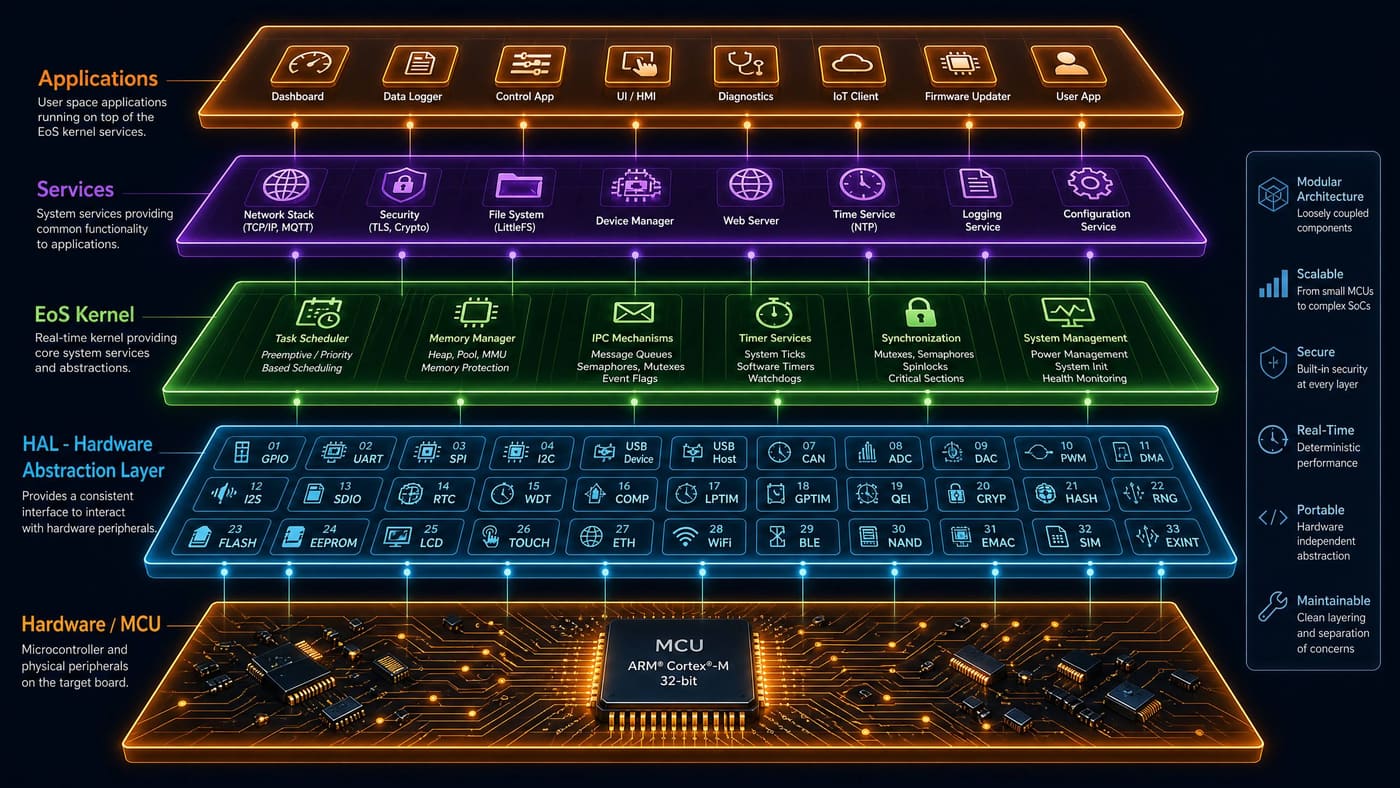
EoStudio is highlighted in the layer below.
Pairs well with
Sibling components that EoStudio commonly works alongside.
Technical Specifications
| Editor Engine | Monaco (VS Code editor component) |
| EoS API Completions | 197 kernel + HAL APIs with inline documentation |
| Supported Boards | 41 (via eBuild BSP profiles) |
| eFlow Blocks | GPIO, Timer, UART, SPI, I²C, PWM, ADC, AI Inference, eDB Query, EIPC Send/Recv |
| AI Assist Model | Phi-3 Mini (4-bit quantized) via eAI |
| Platforms | Windows 10+, macOS 12+, Ubuntu 22.04+ |
| License | MIT |